What are the best strategies for Kindle Publishing income? That is what you will learn by reading my step-by-step guide, this is easier than many seniors realize to supplement their social security. With the high prices many of you might be struggling, this could be the answer you have been praying for.
Affiliate Disclosure
Amazon + Friends
Affiliate Disclosure: Some of the links on this website may be affiliate links. This means that if you click a link and make a purchase, I may earn a small commission at no extra cost to you. These commissions help support 65 Plus Life and Boomer Biz HQ, and Dawg Solutions. so I can continue creating free resources for older adults.
Amazon Disclosure: As an Amazon Associate, I earn from qualifying purchases. Any Amazon links used throughout this website may earn a commission when you purchase through them.
Wealthy Affiliate Disclosure: I am also a proud affiliate of Wealthy Affiliate. If you choose to join their platform through my referral link, I may earn a commission. I only recommend Wealthy Affiliate because it has personally helped me build websites and create income online, and I believe it can help other older adults learn these skills too.
Thank you for supporting my work — it truly means a lot.
Jeff
Best Kindle Publishing Strategies for Steady Income
1. Focus on Low-Competition Niches
Many beginners fail because they pick crowded topics.
What works best for retirees:
- Large print books
- Puzzle books (word search, sudoku)
- Low-content journals
- Simple how-to guides
- Hobby-related books
- Senior-friendly planners
Jeffs Tip
High demand + low competition + simple content
Example niches
- Large print word search for seniors
- Blood pressure trackers
- Medication logs
- Retirement planners
- Gardening journals
- Memory books for grandparents
These are PERFECT for beginners.
2. Start With Low-Content Books
Low-content books include:
- Journals
- Notebooks
- Planners
- Trackers
- Log books
- Puzzle books
Why this works for retirees:
- No advanced writing required
- Faster to publish
- Lower overwhelm
- Can create multiple books quickly
- Builds passive income library
Many successful KDP sellers have 50–200+ simple books.
3. Use the “Volume Strategy”
One book rarely makes big money.
The real strategy:
Publish consistently
Build a catalog
Let royalties stack
Realistic expectations even with no experience
- 1 book → small income
- 10 books → noticeable income
- 30+ books → meaningful side income
- 100+ books → strong income potential
4. Optimize Your Amazon Listings
Many beginners skip this.
Key ranking factors:
- Title keywords
- Subtitle keywords
- Backend keywords
- Categories
- Cover quality
- Reviews
Simple keyword strategy:
Search on Amazon for:
“large print word search for seniors”
Look for:
- Autofill suggestions
- Low review competitors
- Specific long-tail phrases
Long-tail keywords = easier rankings
5. Create Senior-Friendly Designs
This is where your brand can shine.
For the 65+ audience:
Larger fonts
Clean layout
High contrast
Easy instructions
Practical usefulness
Most publishers ignore this — huge opportunity.
“Books designed specifically for comfort and readability.”
That’s powerful.
6. Price Smart for Passive Sales
Typical beginner pricing:
- Journals: $6.99–$9.99
- Puzzle books: $7.99–$12.99
- Planners: $8.99–$14.99
Jeffs Tip:
Don’t price too low
Don’t try to be the cheapest
Aim for perceived value
7. Use Simple Free Tools
Recommended tools:
- Canva — covers & interiors
- Book Bolt — keyword research
- Publisher Rocket
- Amazon KDP — publishing platform
Keep the messaging:
Simple
Low cost
No tech overwhelm
Realistic Income Expectations
Money & Retirement Helpers
Typical beginner timeline:
- Month 1–2 → learning phase
- Month 3–6 → first consistent sales
- 6–12 months → growing passive income
- 12+ months → scalable library income
Frame it as:
“Slow and steady passive income — not get-rich-quick.”
How to Create Your First Book for Amazon KDP
Creating your first book may sound intimidating, but it’s actually very doable — even if you’ve never published anything before. Follow these simple steps and you can have your first book live on Amazon.
Step 1: Choose a Simple Book Idea
Start easy. Your goal is to finish your first book, not create a masterpiece.
Great beginner book types:
- Large print word search
- Daily journal
- Medication tracker
- Blood pressure log
- Simple planner
- Gratitude journal
Jeffs Tip
Search Amazon for your idea and look for books with fewer than 500 reviews — this usually means less competition.
Example beginner idea:
“Large Print Daily Blood Pressure Log Book”
Step 2: Research Keywords on Amazon
Before creating your book, check what people are already searching for.
How to do it:
- Go to Amazon
- Type your idea slowly in the search bar
- Notice the autofill suggestions
- Write down the phrases you see
These are real searches from real buyers.
Example searches:
- large print blood pressure log
- blood pressure tracker for seniors
- medication log book
Use these phrases in your title later.
Step 3: Create Your Book Interior
This is simply the inside pages of your book.
Easy beginner method (recommended):
Use Canva (free version works fine).
Basic process:
- Open Canva
- Create custom size (example: 8.5 x 11 inches)
- Design one clean page
- Duplicate it for your full book
Senior-Friendly Design Tips
- Use large, easy-to-read fonts
- Keep plenty of white space
- Avoid clutter
- Use high contrast (black on white)
- Keep instructions simple
Step 4: Design a Simple Book Cover
Your cover helps your book get clicks.
Again, Canva works great.
https://boomerbizhq.com/discover-ai-tools-for-retirement-planning-success/
Cover tips for beginners:
Large readable title
Clear subtitle
Simple, clean design
High contrast colors
Avoid tiny text
Example title format:
Title:
Large Print Blood Pressure Log Book
Subtitle:
Easy Daily Tracker for Seniors and Adults
Step 5: Create Your Free Amazon KDP Account
Go to:
Sign in with your regular Amazon account.
You’ll set up:
- Author/publisher info
- Payment details
- Tax info
This is a one-time setup.
Step 6: Upload Your Book
Inside KDP, click:
“Create Paperback”
You’ll enter:
- Book title
- Subtitle
- Keywords
- Categories
- Description
- Upload interior PDF
- Upload cover PDF
Take your time — there’s no rush.
Step 7: Set Your Price
For most beginner low-content books:
- $6.99 – $9.99 works well
Amazon will show your royalty before you publish.
Don’t underprice your book — value matters.
Step 8: Publish and Be Patient
After clicking publish:
- Amazon review usually takes 24–72 hours
- Your book will go live
- Sales may take time
Jeffs Tip
Your first book is your learning book, not your retirement plan.
What Successful KDP Publishers Do Next
11 Easy Steps To Kindle Ebook Publishing For Retirement Income
Encourage your readers with this truth:
They publish consistently
They improve each book
They build a catalog
They stay patient
Realistic early goal:
Aim for your first 5–10 books.
That’s when momentum usually starts.
You Can Do This
“You don’t need to be a professional writer or designer to succeed with Kindle publishing. Many retirees are quietly building extra income one simple book at a time.”
Best Free Kindle eBook to Learn Amazon KDP
Kindle Publishing for Beginners
by Brian Jackson
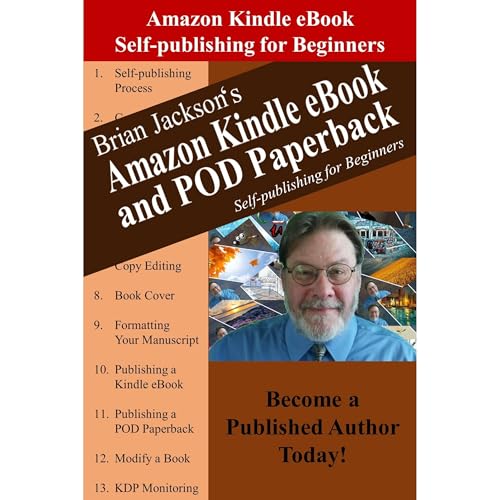
Kindle Unlimited
- Very beginner-friendly
- Plain English explanations
- Walks through the KDP dashboard
- Good first overview
Best for: true beginners and older adults
Focuses more on written books than low-content
Jeffs Tips
Look for books that are:
- Recently updated
- Written for beginners
- Focused on Amazon KDP
- Easy to understand
Reminder From Jeff
“You don’t need to read everything — just learn enough to publish your first book.”
Jeffs Hint
“After you review one of the guides above, follow our step-by-step beginner tutorial here on 65PlusLife to publish your first book.”
Retirees Supplementing Social Security with Kindle Publishing
Many retirees are quietly using Amazon Kindle Direct Publishing (KDP) to create extra monthly income. While most aren’t getting rich, many are successfully covering groceries, utilities, or travel money.
Here are some inspiring examples.
Linda, Age 68 — Large Print Puzzle Books

Background:
Linda retired from a school administrative job and wanted something productive to do at home.
What she published:
- Large print word search books
- Simple crossword collections
- Holiday puzzle books
Her timeline:
- First 3 months: learning and publishing first books
- Month 6: small but steady sales
- Year 1: built catalog of 35 books
Reported results:
About $300–$500/month in royalties
Her advice:
“Consistency mattered more than perfection. Each book got easier.”
Robert, Age 72 — Practical Log Books

Background:
Robert was a retired truck driver looking for a low-stress side income.
What he created:
- Mileage log books
- Maintenance trackers
- Blood pressure logs
- Medication journals
Why it worked:
He focused on useful everyday books people need year-round.
His timeline:
- First sale: about 6 weeks after publishing
- 9 months: catalog reached 50 books
- Year 2: income stabilized
Reported results:
Roughly $200–$400/month
His mindset:
“It’s like planting seeds. The more books you plant, the more grow.”
Carol, Age 65 — Guided Journals for Women

Background:
Carol enjoyed writing and decided to try simple guided journals.
Her niche:
- Gratitude journals
- Retirement reflection journals
- Memory books for grandparents
What helped her succeed:
Clean, senior-friendly design
Warm, encouraging tone
Consistent publishing
Her results after 18 months:
About $150–$300/month
Her encouragement to beginners:
“Your first book won’t be perfect — and that’s okay.”
Jeffs Reality Check
Most retiree KDP publishers:
- Do NOT get rich quickly
- Do NOT succeed with one book
- DO build income gradually
- DO succeed with persistence
- DO treat it like a small publishing business
“Kindle publishing is more like planting a garden than winning the lottery.”
Why This Works Especially Well for Retirees
Advantages retirees have:
- More flexible time
- Life experience for niche ideas
- Patience for long-term growth
- Desire for supplemental income
- Comfort with steady routines
How to Use ChatGPT to Help Write Your First Kindle Book
A simple guide for beginners over 50
Many new authors feel stuck before they even start. The good news? Tools like ChatGPT can help you brainstorm, outline, and draft your first book much faster.
Best Kindle Ebook Reader Buying Guide Revealed
Think of ChatGPT as your writing helper — not a replacement for your ideas.
Step 1: Create a Free ChatGPT Account
Go to:
Sign up with your email and create a free account.
Once inside, you’ll see a chat box where you can type questions or requests.
Step 2: Decide What Type of Book You Want to Create
Before using ChatGPT, choose your book type.
Great beginner options:
- Guided journal
- How-to guide
- Memory book
- Simple planner
- Hobby guide
- Low-content workbook
Keep your first book simple.
Example beginner idea:
“Daily Gratitude Journal for Seniors”
Step 3: Ask ChatGPT to Generate Book Ideas
In the chat box, type something like:
Prompt example:
“Give me 10 beginner-friendly Kindle book ideas for retirees.”
ChatGPT will generate ideas you can review and refine.
Jeffs Tip
Pick an idea that is:
- Useful
- Simple
- Specific
- Not overly competitive
Step 4: Use ChatGPT to Create Your Book Outline
Once you choose your topic, ask for an outline.
Prompt example:
“Create a simple chapter outline for a beginner’s guide to container gardening for seniors.”
This gives structure — and structure prevents overwhelm.
Step 5: Generate Draft Content
This is where many beginners make mistakes
Do NOT ask for the whole book at once.
Instead, work section by section.
Good prompt example:
“Write a friendly, easy-to-read introduction for a gratitude journal designed for seniors.”
Then continue:
“Write 10 gentle daily gratitude prompts for retirees.”
Jeffs Important Tip
Always:
Read the output
Edit in your own voice
Add personal touches
Simplify if needed
Check for accuracy
Why this matters:
Amazon prefers original, human-reviewed content.
Step 6: Polish and Personalize Your Book
This is where your readers add real value.
Encourage them to:
- Add personal stories
- Adjust wording
- Simplify language
- Improve clarity
- Format for readability
Simple rule:
ChatGPT drafts → You refine → Book improves.
Step 7: Format Your Manuscript
After editing:
- Copy text into Word or Google Docs
- Use large, readable fonts
- Add spacing between sections
- Export as PDF for KDP
Jeff recommends:
- Font size 12–14 for ebooks
- Clear headings
- Short paragraphs
Step 8: Publish Through Amazon KDP
Final step:
- Go to kdp.amazon.com
- Click “Create Kindle eBook”
- Upload manuscript
- Add cover
- Enter keywords
- Set price
- Publish
Important Guidelines
Use ChatGPT as a helper, not a copy machine
Always review and edit the content
Avoid copying other books
Add your personal touch
Focus on helping readers
“The most successful KDP authors use AI to work faster — but they still add the human touch.”
Simple Starter Prompts From Jeff
Beginner prompt pack:
- “Give me 10 Kindle book ideas for seniors.”
- “Create an outline for a beginner guide to [topic].”
- “Write a friendly introduction for a book about [topic].”
- “Generate 20 journal prompts for retirees.”
- “Rewrite this paragraph in simpler language: [paste text].”
Using ChatGPT helps retirees:
Overcome writer’s block
Work faster
Reduce overwhelm
Stay confident
Start publishing sooner
Jeff Shares
If you’ve been thinking about writing and publishing your first book, there has never been a better time to start. With simple tools, step-by-step guidance, and a little consistency, many retirees are successfully creating books that generate extra monthly income.
Jeffs Reminder
Remember — your first book does not have to be perfect. What matters most is getting started, learning the process, and building momentum one book at a time. Every successful KDP publisher began exactly where you are now.
Whether you choose to create a helpful guide, a journal, or a large-print book for seniors, the opportunity is real for those who stay patient and keep moving forward.
Ready to Keep Learning?
Visit 65 Plus Lifes Kindle & Reading page for more beginner-friendly articles, tools, and step-by-step tutorials designed to help you confidently write, publish, and grow your first Amazon book.
We’re here to help you every step of the way.
Thank you for taking the time to read my article ” What are the best strategies for Kindle Publishing income,”
Jeff
Affiliate Disclosure
Amazon Disclosure: As an Amazon Associate, I earn from qualifying purchases. Any Amazon links used throughout this website may earn a commission when you purchase through them.
- Acrylic Paint Brush Grips For Arthritis HandsAcrylic paint brush grips for arthritis hands are for people who love painting with acrylics, arthritis pain in the hands can make things tough. Stiffness, swelling, or grip weakness can get in the way of creativity, but new brush grips and some smart adaptations can help keep painting feel enjoyable and doable. Over time, I’ve … Read more
- How To Start Acrylic Painting As A Retiree With Beginner BooksStarting something creative in retirement can feel exciting and a little daunting. Acrylic painting is one of those hobbies that feels approachable, even if you’ve never picked up a brush before. It’s a hobby you can start at your own pace, right at your kitchen table, and it offers some surprising health perks, too. Why … Read more
- 10 Best Support Networks For Elderly Caregivers10 best support networks for elderly caregivers can be extremely valuable. Caregivers need as much support as they can possible receive, and being a older caregiver myself motivated me to share this information with you. Affiliate Disclosure Amazon + Friends Affiliate Disclosure: Some of the links on this website may be affiliate links. This means … Read more
- Easy Adaptive Digital Art Techniques For ArthritisEasy adaptive digital art techniques for arthritis suffers is to help people ready to give up from their arthrits limitations, now everyone might not be able to use these techniques depending on your arthritis severity. For those of you interested, this article is for you. Affiliate Disclosure Amazon + Friends Affiliate Disclosure: Some of the … Read more
- How To Maximize Your Kindle Unlimited AccountHow to maximize your kindle unlimited account without overspending your budget. Since joining kindle unlimited I have learned more than I could have otherwise, I download ebooks that will help me educate myself on gaining more writing skills. Affiliate Disclosure Amazon + Friends Affiliate Disclosure: Some of the links on this website may be affiliate … Read more
- How To Compare AARP Membership Plans For 2026How to compare AARP memberships plans for 2026. Making the decision to invest in an AARP membership plan or plans can be confusing for many, we are going to try our best to compare AARP membership plans in this article to make it easier for you. Affiliate Disclosure Amazon + Friends Affiliate Disclosure: Some of … Read more
- Is AARP Worth Joining In 2026 For Unexpected RetirementIs AARP worth joining in 2026 for most couples. Many couples will be trying to decide if its worth them to become a member of AARP. 65 Plus Life will be providing you information in hopes to making this decision less stressful. Affiliate Disclosure Amazon + Friends Affiliate Disclosure: Some of the links on this … Read more
- Are AARP Benefits Worth It In 2026 Help For Confused ReadersAre AARP beneits worth it in2026 help for confused readers. AARP can drive you crazy filling your email and snail mailbox, many of us are confused if this is something worth us joining. This article is to try my best to help any confused readers to make the best decision for themselves. Affiliate Disclosure Amazon … Read more
- Is AARP Worth It For Seniors 2026 Pros And ConsIs AARP worth it for seniors 2026 pros and cons might be on your mind as well, everyone might not benefit from being a member of AARP. That is what I am dealing with right now myself, trying to figure out myself. Affiliate Disclosure Amazon + Friends Affiliate Disclosure: Some of the links on this … Read more
- Best Adaptive Clothing Brands For 2026 ShoppersBest adaptive clothing brands for 2026 shoppers will help seniors in need of this type of clothing. With my neuropathy, I often struggling with buttons and zippers. Many of you might experience similar problems dressing from time to time, I am going to help you with the best brands for you to consider. Affiliate Disclosure … Read more
What a fantastic step-by-step guide, Jeff! As someone who has been looking into ways to supplement retirement income without a lot of tech overwhelm, this breakdown of Kindle publishing strategies is exactly what I needed. I especially loved the point about starting with low-content books like journals, planners, and large print puzzle books — it makes the whole process feel much more manageable for seniors just getting started.
Good to hear from you Leah,
Kindle Publishing is a very good method for supplementing your income online, its low investment which makes it perfect for those living on a low-income or fixed-income. Anyone can write and publish an ebook by following my guide, I highly recommend Kindle Publishing for anyone interested in supplementing their income or preparing for retirement.
Jeff