How seniors can use social media safely is an important topic to know about. That is the reason I decided to write an article in hopes in helping older adults. Even seniors are using the internet today, so knowing how for them to remain safe is important to me.
Affiliate Disclosure
Amazon + Wealthy Affiliate + Friends
Affiliate Disclosure: Some of the links on this website may be affiliate links. This means that if you click a link and make a purchase, I may earn a small commission at no extra cost to you. These commissions help support 65 Plus Life, Boomer Biz HQ, and Dawg Solutions. so I can continue creating free resources for older adults.
Amazon Disclosure: As an Amazon Associate, I earn from qualifying purchases. Any Amazon links used throughout this website may earn a commission when you purchase through them.
Wealthy Affiliate Disclosure: I am also a proud affiliate of Wealthy Affiliate. If you choose to join their platform through my referral link, I may earn a commission. I only recommend Wealthy Affiliate because it has personally helped me build websites and create income online, and I believe it can help other older adults learn these skills too.
Thank you for supporting my work — it truly means a lot.
Jeff
Facebook Staying Connected While Staying Safe
Facebook is one of the most popular social media platforms among adults age 50 and over. Many seniors use Facebook to keep in touch with family and friends, view photos of grandchildren, join hobby groups, and stay updated on community events.
While Facebook can be a wonderful tool for connection, it’s important to understand how to use it safely.
Why Seniors Like Facebook
Facebook is especially appealing because it allows users to:
- Stay in touch with family and old friends
- Share photos and memories
- Join groups based on interests or local communities
- Receive updates without needing advanced technical skills
That said, scammers and hackers often target older adults, which makes knowing a few basic safety rules essential.
Common Facebook Risks for Seniors
Here are some of the most common problems seniors may encounter on Facebook:
- Fake friend requests pretending to be someone you know
- Scam messages claiming you’ve won money or prizes
- Phony charity requests, especially after disasters
- Impersonation accounts using stolen photos
- Links that lead to malware or fake websites
The good news? Most of these can be avoided with simple precautions.
Facebook Safety Tips Every Senior Should Follow

1. Be careful with friend requests
Only accept requests from people you personally know. If someone claims to be a friend or relative but you’re unsure, ask them a question only the real person would know.
2. Keep your personal information private
Avoid posting your phone number, home address, full birthdate, or travel plans. This information can be used by scammers.
3. Think before you click
Never click on suspicious links—even if they appear to come from a friend. If something seems odd, it probably is.
4. Use strong passwords
Create a password that is unique to Facebook and not used anywhere else. Avoid birthdays, names, or simple words.
5. Enable two-factor authentication
This adds an extra layer of protection by sending a code to your phone or email when someone tries to log in.
6. Ignore “too good to be true” offers
If a message claims you’ve won money, gift cards, or prizes you didn’t enter for—it’s almost always a scam.
What to Do If Something Feels Wrong
If you see a suspicious post or message:
- Do not respond
- Do not click links
- Report it to Facebook
- Block the account if necessary
If you believe your account has been compromised, change your password immediately and notify a trusted family member for help.
Being Careful
Facebook can be a safe and enjoyable way for seniors to stay connected—as long as it’s used wisely. By following a few basic safety habits, older adults can enjoy the benefits of social media without unnecessary risk.
A Safe Facebook Profile Setup Guide
This example shows how to set up a Facebook profile so you can enjoy connecting with people without sharing too much personal information.
Step 1: Choose a Profile Name
- Use the name friends and family recognize (example: “Pat Johnson”).
- If you prefer more privacy, you can use a variation like “Pat J.”
(Just don’t use something so different that real friends can’t find you.)
Jeffs Tip
Avoid using your middle name + hometown + graduation year that can help scammers guess passwords
Step 2: Pick a Profile Photo Carefully
A friendly photo is fine—but choose one that doesn’t reveal too much.
- A simple head-and-shoulders picture works best.
- Make sure it does not show your house number, street sign, car license plate, or other identifying details.
Jeffs Tip
A clear face photo taken indoors is recommended
Step 3: Skip Sensitive Personal Details
When Facebook asks for profile details, keep it simple.
Recommended:
- City/state only (example: “Tampa, Florida”) — or skip it entirely
- Favorite hobbies (gardening, cooking, travel, golf, etc.)
Avoid adding:
- Phone number
- Home address
- Full birthdate (month/day/year)
- Where you work (optional, but consider skipping)
- “Widowed,” “single,” or other details that scammers often target
Jeffs Tip
If Facebook asks for your birthday, you can still enter it for account purposes, but later you’ll set it so only you can see it is recommended.
Step 4: Set Your Basic Privacy
After your account is created, go to:
Settings & privacy → Settings → Privacy
Now choose these safer defaults:
- Who can see your future posts? → Friends
- Who can send you friend requests? → Friends of friends
- Who can look you up using your phone number/email? → Friends
- Do you want search engines outside of Facebook to link to your profile? → No
These settings prevent strangers from easily finding or contacting you.
Step 5: Lock Down Your Birthday Visibility
Go to your profile → click About → Contact and basic info
For your birthday:
- Set Birthday visibility → Only me
- Set Birth year visibility → Only me
Why this matters: birthdays are commonly used in identity theft and password guessing by scammers
Step 6: Control Who Can See Your Friends List
On your profile:
Friends → (three dots) → Edit Privacy
Set:
- Who can see your friends list? → Only me (or Friends)
This helps prevent scammers from targeting your friends and family through you.
Step 7: Add a Cover Photo That Doesn’t Reveal Location
Cover photos are public more often than people realize.
Choose:
- A nature photo
- A pet photo
- A simple hobby photo (garden, fishing, etc.)
Avoid:
- A picture taken in front of your home
- Photos showing your street, neighborhood signs, or local landmarks
Step 8: Turn On Two-Factor Authentication Strongly Recommended
Go to:
Settings & privacy → Settings → Accounts Center → Password and security → Two-factor authentication
Choose:
- Text message codes, or
- An authentication app (even stronger)
This makes it much harder for anyone else to get into your account. Years ago my account was hacked on Facebook, that was before I was experienced in using Facebook and the internet safely.
Step 9: Do a Quick “Stranger Check”
Before you start adding lots of friends, do this:
- Visit your profile
- Use Facebook’s “View As” feature (if available) to see what the public can see
If anything personal shows up publicly, change that setting right away.
A Safe Example Profile
Here’s what a “safe but friendly” profile might include:
First name + last name (or last initial)
A clear profile photo with no location clues
Hobbies and interests
City/state or nothing at all
Friends-only posts
Birthday hidden
Two-factor authentication enabled
When NOT to Accept a Friend Request
Not every friend request is friendly. If you see any of the signs below, it’s safest to ignore, delete, or block the request.
1. You Don’t Recognize the Person
If you don’t personally know them and can’t place them from real life, don’t accept the request—even if you share mutual friends.
2. The Profile Looks Brand New
Be cautious if the account:
- Was created recently
- Has very few photos or posts
- Has little personal information
Many scam accounts are created just days or weeks before being used.
3. The Profile Photo Looks “Too Perfect”
Photos that look like professional models, stock photos, or military portraits are often fake.
Jeffs Tip
Scammers frequently use attractive photos to build trust quickly. Overly handsome men and beautiful women photos are red flags.
4. They Message You Right Away
A major warning sign is someone who:
- Sends a private message immediately
- Asks personal questions too quickly
- Pushes for conversation outside Facebook (email, texting, WhatsApp)
Real friends usually start talking with you on the platform for a lengthy time period before moving to other communication methods.
5. They Claim to Be in the Military or Working Overseas
This is a very common scam. These profiles often:
- Say they’re stationed overseas
- Can’t video chat
- Eventually ask for money, gift cards, or “help”
6. They Ask for Money or Financial Help
Never accept a friend request from someone who:
- Asks for money
- Requests gift cards
- Claims an emergency or “investment opportunity”
Friends and organizations do not ask for money this way.
7. They Say Facebook Is “Deleting Their Account”
Messages claiming your account will be shut down unless you click a link are always scams.

Jeffs Tip
Facebook does not send warning such as this that I have ever known about, so I recommend you ignore any messages of this type and then report this to Facebook right away.
8. They Pretend to Be Someone You Already Know
If a “friend” sends a new request but you’re already connected to them:
- Do not accept it
- Contact the person another way to confirm
- Report the duplicate profile
What To Do Instead
If something feels off:
- Don’t respond
- Don’t click links
- Delete the request
- Block and report the account
- If it feels strange, it probably is.
What NOT to Share on Facebook Posts
Facebook is meant for staying connected, but some information should always stay private. Even innocent-looking posts can give scammers more information than you realize.
Below are the most important things seniors should avoid posting or sharing.
1. Your Home Address or Phone Number
Never post:
- Your full home address
- Phone number (mobile or landline)
- Photos showing house numbers or street signs
Scammers can use this information for identity theft or fraud.
2. Full Birthdate or Age
Your birthday is often used to guess passwords and security questions.
Safer option:
- Keep your birthday visible only to you
- If you want birthday wishes, allow friends only to see the day and month — not the year
3. Travel Plans
Avoid posting:
- “We’re leaving for Florida for two weeks!”
- Airport check-ins
- Vacation countdown posts
These posts publicly signal that your home may be empty.
Jeffs Tip
Share vacation photos after you return home just to be safe.
4. Financial Information
Never share:
- Bank or credit card details
- Social Security information
- Pension, Social Security, or investment details
- Photos of checks or statements
Legitimate companies will never ask for this information on Facebook. So no matter how convincing they might be, never give out this infomaton on the platform to anyone.
5. Health or Medical Details
While support groups can be helpful, be careful not to publicly share:
- Medical conditions
- Medications
- Doctors’ names or appointment schedules
Scammers sometimes target people based on health information.
6. Emotional or Personal Struggles
Posting about loneliness, grief, or financial stress can attract scammers pretending to “help.”
Jeffs Tip
- Share sensitive topics in private messages with trusted family or friends
- Use private, well-moderated groups instead of public posts
7. Photos That Reveal Too Much
Before posting a photo, check for:
- Mail with your address showing
- License plates
- Prescription bottles
- House keys
- Computer screens or paperwork
A quick glance can reveal more than you expect.
8. Forwarded Warnings or Panic Messages
Posts claiming:
- “Facebook is stealing your photos”
- “Share this or your account will be deleted”
- “I do not give Facebook permission…”
These are false and often spread misinformation. Facebook does not work this way.
9. Quizzes and Games That Ask Personal Questions
Avoid quizzes asking for:
- Your first car
- Your mother’s maiden name
- Your childhood street
- Pet names
These answers are often used for password recovery and identity theft.
A Simple Rule to Remember
Before posting, ask yourself:
“Would I be comfortable if a stranger saw this?”
If the answer is no — don’t post it
Facebook is safest when you
- Share less personal information
- Post with friends only
- Keep sensitive details offline
A little caution goes a long way toward protecting your privacy and peace of mind.
Common Facebook Safety Questions Seniors Ask
Staying safe on Facebook doesn’t mean staying silent. Many older adults can enjoy Facebook daily while protecting their privacy by following a few simple guidelines.
Below are answers to the most common questions seniors ask.
Is Facebook safe for seniors to use?
Yes — Facebook can be safe if you use basic privacy settings and stay alert. Most problems happen when people overshare personal information or interact with strangers they don’t know.
You don’t need to be an expert. A few smart habits go a long way.
Do I have to accept every friend request?
Absolutely not.
You are never required to accept a friend request. It’s perfectly okay to:
- Ignore it
- Delete it
- Block the person
Only connect with people you personally know and trust.
Can strangers see my posts?
Not if your settings are correct.
You can choose who sees your posts:
- Friends only is the safest option
- Avoid posting publicly unless you truly intend to
It’s a good idea to check your privacy settings occasionally to make sure nothing has changed.
Is it okay to just read posts and not comment or share?
Yes — and many seniors do exactly that.
You can:
- Read updates
- Look at photos
- Follow pages or groups
- Watch videos
without ever posting or commenting. Being “quiet” on Facebook is completely fine.
What should I do if I accidentally click a suspicious link?
Don’t panic.
If it happens:
- Close the page immediately
- Do not enter any personal information
- Run a virus scan on your device (if possible)
- Change your Facebook password just to be safe
If you’re unsure, ask a trusted family member for help.
Do I need to post photos to stay connected?
No. Photos are optional.
If you enjoy sharing pictures, that’s great — just:
- Avoid photos showing addresses, mail, or documents
- Share with friends only
- Skip location tags
You can still stay connected by liking or commenting instead.
How often should I check Facebook?
That’s completely up to you.
Some seniors check once a day, others once a week. There’s no right or wrong amount — use it in a way that feels comfortable and enjoyable.
What if I make a mistake on Facebook?
Everyone does — including younger users.
Mistakes can almost always be fixed by:
- Deleting a post
- Changing a privacy setting
- Blocking or reporting someone
You’re not alone, and help is always available.
Can I leave Facebook if I decide it’s not for me?
Yes. You’re always in control.
You can:
- Take a break
- Limit your activity
- Or deactivate your account entirely
Facebook should serve you, not the other way around.
The Takeaway
You don’t have to give up connection to stay safe.
By:
- Sharing carefully
- Choosing friends wisely
- Using privacy settings
Older adults can enjoy Facebook confidently while protecting their personal information.
Common Facebook Scams Targeting Seniors and How to Spot Them Fast
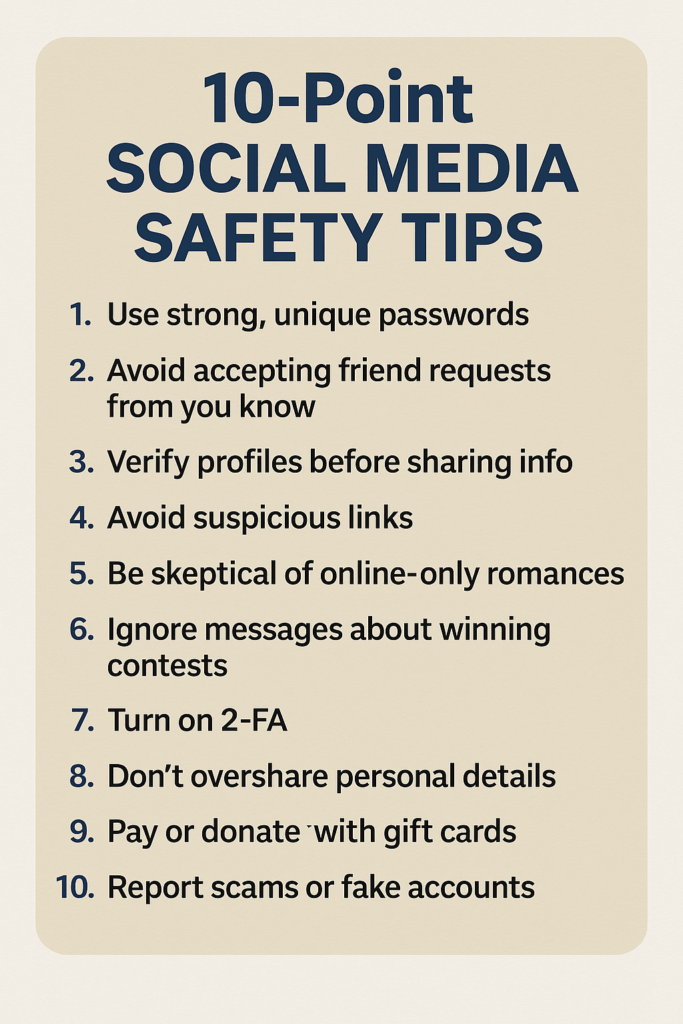
Scammers often target older adults on Facebook because they know many people are friendly, trusting, and active in groups. Learning the most common scams makes them much easier to spot — and avoid.
1. Fake Friend or Impersonation Scams
How it works:
A scammer creates a new profile using photos and a name that looks like someone you already know, then sends you a friend request or message.
Quick warning signs:
- You’re already friends with the real person
- The new account has few posts or photos
- The message feels vague or unusual
Jeffs Tip
Do not accept. Contact the real person another way to confirm, then report the fake account.
2. Romance Scams
How it works:
Someone you don’t know starts a friendly conversation, then becomes emotionally attached very quickly. Over time, they ask for money, gift cards, or “help.”
Common claims:
- Working overseas or in the military
- Can’t video chat
- Suddenly needs money for an emergency
Quick warning signs:
- Fast emotional attachment
- Avoids meeting in person or on video
- Requests for secrecy or money
Jeffs Tip
Stop communication immediately. Block and report the account.
3. Prize, Lottery, or Giveaway Scams
How it works:
You receive a message claiming you’ve won money, a prize, or a giveaway — even though you never entered anything.
Quick warning signs:
- Requests for fees or “verification payments”
- Asks for gift cards or personal information
- Poor grammar or strange wording
Jeffs Tip
Ignore and delete. Real prizes don’t ask for payment.
4. “Facebook Account Warning” Scams
How it works:
A message claims your account will be disabled unless you click a link or confirm your information.
Quick warning signs:
- Urgent language
- Links asking you to log in
- Messages sent through Messenger instead of Facebook notifications
Jeffs Tip
Do not click. Facebook does not send account warnings this way.
5. Charity and Disaster Relief Scams
How it works:
After natural disasters or emergencies, scammers pretend to represent charities and ask for donations.
Quick warning signs:
- Pressure to donate immediately
- Requests for gift cards or direct payments
- No official website or contact information
Jeffs Tip
Only donate through well-known charities’ official websites.
6. Fake Investment and Cryptocurrency Scams
How it works:
A stranger or online “friend” offers an investment opportunity promising quick or guaranteed returns.
Quick warning signs:
- “Guaranteed profits”
- Pressure to act fast
- Requests to move conversations off Facebook
Jeffs Tip
Never invest based on social media messages. Block and report.
7. Grandparent or Family Emergency Scams
How it works:
You receive a message claiming a grandchild or relative is in trouble and urgently needs money.
Quick warning signs:
- Requests for secrecy
- Urgent financial requests
- Vague details
Jeffs Tip
Pause. Contact the family member directly using a known phone number.
The Fastest Scam-Spotting Rule
If a message:
- Creates urgency
- Asks for secrecy
- Requests money or personal information
Jeffs Tip
Those three signs almost always indicate a scam.
When in Doubt
- Don’t respond
- Don’t click links
- Ask a trusted family member
- Report and block the account
Jeffs Reassurance
Scammers rely on pressure and confusion. Taking a moment to pause is often all it takes to stay safe.
Enjoy Facebook — Just Use It Wisely
Facebook can be a wonderful way for older adults to stay connected with family, friends, and the world around them. From sharing photos and memories to keeping up with loved ones, Facebook offers real benefits when used thoughtfully.
Staying safe doesn’t mean being suspicious of everyone or giving up social media altogether. It simply means:
- Sharing less personal information
- Being selective about friend requests
- Pausing before clicking links or responding to messages
- Trusting your instincts when something feels off
Scammers depend on urgency, secrecy, and emotional pressure. By slowing down and following the safety tips in this guide, you greatly reduce the risk of being taken advantage of.
Remember — you are always in control of what you share, who you connect with, and how you use Facebook. If a post, message, or request doesn’t feel right, it’s okay to ignore it, delete it, or ask for help from someone you trust.
Facebook should be a place of connection, not stress. With a few smart habits and a little caution, seniors can enjoy everything Facebook has to offer — safely, confidently, and on their own terms.
Thank you for reading ” How Seniors Can Use Social Media Safely”,
Jeff

Affiliate Disclosure
Affiliate Disclosure: Some of the links on this website may be affiliate links. This means that if you click a link and make a purchase, I may earn a small commission at no extra cost to you. These commissions help support 65 Plus Life, Boomer Biz HQ, and Dawg Solutions. so I can continue creating free resources for older adults.
- What Is Acrylic Painting Layering For LandscapesWhat is acrylic painting layering for landscapes will guide you step-by-step on your new adventure to acrylic painting Affiliate Disclosure: Some of the links on this website may be affiliate links. This means that if you click a link and make a purchase, I may earn a small commission at no extra cost to you. … Read more
- Acrylic Paint Brush Grips For Arthritis HandsAcrylic paint brush grips for arthritis hands are for people who love painting with acrylics, arthritis pain in the hands can make things tough. Stiffness, swelling, or grip weakness can get in the way of creativity, but new brush grips and some smart adaptations can help keep painting feel enjoyable and doable. Over time, I’ve … Read more
- How To Start Acrylic Painting As A Retiree With Beginner BooksStarting something creative in retirement can feel exciting and a little daunting. Acrylic painting is one of those hobbies that feels approachable, even if you’ve never picked up a brush before. It’s a hobby you can start at your own pace, right at your kitchen table, and it offers some surprising health perks, too. Why … Read more
- 10 Best Support Networks For Elderly Caregivers10 best support networks for elderly caregivers can be extremely valuable. Caregivers need as much support as they can possible receive, and being a older caregiver myself motivated me to share this information with you. Affiliate Disclosure Amazon + Friends Affiliate Disclosure: Some of the links on this website may be affiliate links. This means … Read more
- Easy Adaptive Digital Art Techniques For ArthritisEasy adaptive digital art techniques for arthritis suffers is to help people ready to give up from their arthrits limitations, now everyone might not be able to use these techniques depending on your arthritis severity. For those of you interested, this article is for you. Affiliate Disclosure Amazon + Friends Affiliate Disclosure: Some of the … Read more
- How To Maximize Your Kindle Unlimited AccountHow to maximize your kindle unlimited account without overspending your budget. Since joining kindle unlimited I have learned more than I could have otherwise, I download ebooks that will help me educate myself on gaining more writing skills. Affiliate Disclosure Amazon + Friends Affiliate Disclosure: Some of the links on this website may be affiliate … Read more
- How To Compare AARP Membership Plans For 2026How to compare AARP memberships plans for 2026. Making the decision to invest in an AARP membership plan or plans can be confusing for many, we are going to try our best to compare AARP membership plans in this article to make it easier for you. Affiliate Disclosure Amazon + Friends Affiliate Disclosure: Some of … Read more
- Is AARP Worth Joining In 2026 For Unexpected RetirementIs AARP worth joining in 2026 for most couples. Many couples will be trying to decide if its worth them to become a member of AARP. 65 Plus Life will be providing you information in hopes to making this decision less stressful. Affiliate Disclosure Amazon + Friends Affiliate Disclosure: Some of the links on this … Read more
- Are AARP Benefits Worth It In 2026 Help For Confused ReadersAre AARP beneits worth it in2026 help for confused readers. AARP can drive you crazy filling your email and snail mailbox, many of us are confused if this is something worth us joining. This article is to try my best to help any confused readers to make the best decision for themselves. Affiliate Disclosure Amazon … Read more
- Is AARP Worth It For Seniors 2026 Pros And ConsIs AARP worth it for seniors 2026 pros and cons might be on your mind as well, everyone might not benefit from being a member of AARP. That is what I am dealing with right now myself, trying to figure out myself. Affiliate Disclosure Amazon + Friends Affiliate Disclosure: Some of the links on this … Read more
As a millennial who has spent countless “tech support” hours with my older relatives, I have seen the Social Media Fear firsthand. It’s heartbreaking because, for them, the internet feels like a dark alleyway where everyone is trying to snatch their purse. They hear one horror story about a scam and they want to delete their whole digital existence!
I totally agree with you Leah,
Many older adults are scared of the internet because of hearing from many of their older friends that they got scammed online, but if you are smart and follow my guide you can be safe and active online.
Jeff