How to publish a book on kindle can be very useful for retirement income. I for one have dreamed about writing and publishing a kindle ebook, so we are going together learn how we can accomplish this goal.
Affiliate Disclosure
Amazon + Friends
Affiliate Disclosure: Some of the links on this website may be affiliate links. This means that if you click a link and make a purchase, I may earn a small commission at no extra cost to you. These commissions help support 65 Plus Life, Boomer Biz HQ, and Dawg Solutions. so I can continue creating free resources for older adults.
Amazon Disclosure: As an Amazon Associate, I earn from qualifying purchases. Any Amazon links used throughout this website may earn a commission when you purchase through them.
Wealthy Affiliate Disclosure: I am also a proud affiliate of Wealthy Affiliate. If you choose to join their platform through my referral link, I may earn a commission. I only recommend Wealthy Affiliate because it has personally helped me build websites and create income online, and I believe it can help other older adults learn these skills too.

Thank you for supporting my work — it truly means a lot
Jeff
How To Publish A Book On Kindle From Jeff
For as long as I can remember, I’ve dreamed of writing a book.
Not a bestseller. Not a literary masterpiece. Just a real book—one with my name on the cover, something I could hold in my hands and say, “I did this.” Like a lot of people, I had ideas tucked away in notebooks, half-written drafts on my computer, and that little voice in my head saying, “Someday.”
But “someday” has a funny way of never showing up.
Traditional publishing felt intimidating, expensive, and completely out of reach. I didn’t have an agent. I didn’t know anyone in the publishing world. And honestly, I assumed publishing a book was something only “real writers” did—not regular people like me.
Then I discovered Kindle publishing.
Suddenly, the dream didn’t feel so far-fetched. I learned that I didn’t need a publisher’s permission, a big upfront investment, or years of waiting. I could write a book, publish it on Kindle, and share my knowledge with the world—on my own terms.
That’s when everything changed for me and possibly you
How to Brainstorm the Right Book Idea for Kindle
One of the biggest myths about publishing on Kindle is that you need a brilliant, never-been-done-before idea.
You don’t.
In fact, the best Kindle books usually come from experience, not inspiration.
Start With What You Already Know
If you’re over 50, you’ve spent decades learning things—through work, life, mistakes, and hard-earned wins. That knowledge is valuable, especially to people who are just a few steps behind you.
Ask yourself:
- What do people often ask me for help with?
- What problem have I already solved in my life or business?
- What do I know now that I wish I had known 10 or 20 years ago?
Your book doesn’t have to cover everything. It just needs to solve one clear problem.
Think “Helpful,” Not “Perfect”
Kindle readers are usually looking for:
- Quick answers
- Clear steps
- Practical guidance they can use right away
This is great news because it means your book can be short, focused, and to the point.
Some strong beginner-friendly Kindle ideas include:
- How-to guides
- Checklists and step-by-step systems
- Beginner roadmaps
- Simple problem-solution books
If your idea helps someone save time, avoid mistakes, or feel less overwhelmed, you’re on the right track.
Look at What’s Already Selling
A simple way to brainstorm is to browse Kindle and look at books in your area of interest.
Search for topics related to your idea and notice:
- Repeated questions in book titles
- Common problems readers are trying to solve
- Gaps—things you could explain more clearly or simply
If books already exist on the topic, that’s a good sign. It means people are buying.
Your goal isn’t to reinvent the wheel—it’s to make it easier to use.
Narrow It Down to One Clear Promise
Once you have a few ideas, narrow them down by asking:
- Can I explain this in 50–150 pages?
- Does it solve one specific problem?
- Would someone pay a few dollars to get this answer faster?
If the answer is yes, you have a solid Kindle book idea.
Optional closing transition:
If you can clearly explain who the book is for and what problem it solves, you’re already ahead of most first-time authors.
How to Validate Your Kindle Book Idea
One of the smartest things you can do before writing your Kindle book is validate your idea first.
Validation doesn’t mean asking permission or waiting for approval. It simply means making sure real people are already interested in the topic—so you’re not guessing.
The good news? You can do this in less than an hour.
Step 1: Search Your Topic on Amazon Kindle
Go to Amazon and type your main topic into the search bar.
Pay attention to:
- The autocomplete suggestions Amazon shows you
- Book titles that repeat similar phrases
- Whether the books look current and active
Amazon’s search bar is powered by real buyer behavior. If suggestions appear, people are searching for that topic.
That’s your first green light.
Step 2: Check the Top 10–20 Books in Your Niche
Click on several of the top-ranking books and look closely at:
- Their titles and subtitles
- The book descriptions
- The number of reviews
You’re not trying to copy anyone. You’re looking for clues:
- What problems are readers trying to solve?
- What angle keeps showing up?
- Are the books short and practical? (Many successful Kindle books are.)
If books in your topic have reviews—even a modest number—that’s a sign there’s demand.
Step 3: Read the Reviews
This step is pure gold.
Scroll down to the reviews and focus on:
- Complaints like “too basic” or “not detailed enough”
- Requests for examples, clarity, or step-by-step guidance
- Confusion points readers mention repeatedly
Those comments tell you exactly how you can improve—or narrow—your book idea.
You’re not competing with these books; you’re finishing the job they started.
Step 4: Ask Yourself One Honest Question
Before you commit, ask:
“Can I explain this more clearly, simply, or practically than what I’m seeing?”
If the answer is yes—even just for beginners—you’re ready to move forward.
Step 5: Sanity-Check Your Idea
A strong validated Kindle book idea usually:
- Solves one specific problem
- Has proof of demand (existing books + reviews)
- Feels manageable to write in a few weeks, not years
If your idea passes those tests, stop researching and start outlining.
How to Outline Your Kindle Book Quickly
If you’ve ever stared at a blank page wondering where to start, you’re not alone. A lot of first-time authors get stuck here—not because they can’t write, but because they think outlining has to be complicated.
It doesn’t.
Your Kindle book outline is simply a roadmap, not a contract. Its only job is to keep you moving forward.
Start With the End in Mind
Begin by asking one simple question:
What should the reader be able to do after they finish this book?
Write that answer down in one sentence.
That outcome becomes the anchor for your entire outline.
Break the Outcome Into Steps
Now ask yourself:
What steps would I naturally explain if I were helping a friend with this problem?
Those steps become your main chapters.
Most Kindle books work beautifully with:
- 5–10 core chapters
- One clear idea per chapter
- A logical, step-by-step flow
If you can explain the process verbally, you can outline it.
Use the “Sticky Note” Method
Here’s a simple trick that works every time:
- Write each chapter idea as a short phrase
- Don’t worry about order at first
- Just get everything out of your head
Once they’re written, arrange them in a sequence that makes sense. That’s your outline.
No fancy software required.
Keep Chapters Short and Focused
Remember, Kindle readers like clarity and momentum.
Each chapter should:
- Cover one main point
- Answer one specific question
- Move the reader closer to the result they want
If a chapter feels too big, split it in two. Shorter chapters are easier to write and easier to read.
Add Simple Subheadings
Under each chapter, jot down:
- 3–5 bullet points of what you’ll cover
- Examples or tips you don’t want to forget
That’s it. You’ve just created a writing guide for yourself.
Give Yourself Permission to Adjust Later
Your outline is allowed to change.
In fact, it probably will—and that’s a good thing. Writing often clarifies ideas. The outline just keeps you from getting lost along the way.
Transition to the next section:
Once your outline is in place, the hardest part is over. Now it’s just a matter of writing—one chapter at a time.
How to Write Your Kindle Book Consistently
30 Minutes a Day Writing Plan
One of the biggest reasons people never finish a book isn’t lack of ability—it’s lack of consistency.
The good news? You don’t need hours of uninterrupted time to write a Kindle book. You just need a simple, repeatable routine.
Commit to Small, Daily Progress
Thirty minutes a day may not sound like much, but it’s powerful.
At a relaxed pace, you can write:
- 300–500 words in 30 minutes
- 2,000–3,000 words per week
- A short Kindle book in a few weeks
That’s how books actually get finished—one small session at a time.
Write One Chapter at a Time
When you sit down to write, only focus on:
- One chapter
- One section
- One idea
Don’t edit. Don’t reread yesterday’s work. Just move forward.
Momentum beats perfection every time.
Use Your Outline as a Daily Writing Prompt
Your outline is your secret weapon.
Before each session:
- Look at your next bullet point
- Write only about that point
- Stop when your 30 minutes are up
You never have to ask, “What should I write today?” The decision is already made.
Create a Simple Writing Habit
Consistency comes from removing friction.
Try this:
- Write at the same time each day if possible
- Use the same place and device
- Set a timer for 30 minutes
When the timer ends, stop—even if you feel like you could keep going. This trains your brain to show up again tomorrow.
Give Yourself Permission to Write “Bad First Drafts
Your first draft is supposed to be imperfect.
That’s normal.
You can’t edit a blank page, but you can improve a messy one. Focus on getting your ideas out clearly. Polishing comes later.
Track Progress, Not Word Count
Instead of obsessing over numbers, track:
- Days you showed up
- Chapters completed
- Forward movement
Checking off progress builds confidence—and confidence builds consistency.
Jeffs Encouragement

You don’t need to be a writer to write a Kindle book. You just need to be someone willing to help others and show up consistently for 30 minutes a day.
How to Edit Your Kindle Book Without Getting Overwhelmed
If I’m being honest, editing is the part I dreaded the most.
Writing feels exciting—I am finally doing the thing I’d dreamed about for years. But editing? That feels intimidating. I pictured endless rewrites, red ink everywhere, and the fear that maybe what I’d written “wasn’t good enough.”
What I eventually learned is editing doesn’t have to be overwhelming if you approach it in stages.
You don’t fix everything at once.
Step Away Before You Edit
Once I finish my first draft, the best thing I should do is stop writing.
I step away for a few days. No tinkering. No rereading. When I came back, I could finally see the book as a reader—not as the person who had just poured everything onto the page.
That little bit of distance will make editing much less overwhelming
Edit for Clarity First, Not Perfection
On my first editing pass, I don’t want to worry about grammar, spelling, or fancy wording.
I plan to focus on three simple questions:
- Does this make sense?
- Is this helpful?
- Would I understand this if I were brand new to the topic?
If something feels confusing, I will rewrite it in simpler language. If a section wandered, I will trim it. That alone will clean up most of the book.
Edit One Chapter at a Time
Trying to “fix the whole book” is where overwhelm creeps in.
Instead:
- Open one chapter
- Edit only that chapter
- Stop when it’s done
Small wins keep you moving forward—and moving forward is what gets books published.
Save the Technical Stuff for Last
Grammar, spelling, and formatting come after your message is clear.
You can:
- Run your manuscript through a basic grammar tool
- Read sections out loud to catch awkward phrasing
- Fix obvious errors as you go
You don’t need to sound like a professional author. You need to sound like you.
Remember Why You Started
Whenever I felt stuck or overly critical, I remind myself why I started this journey in the first place.
I wasn’t trying to impress anyone.
I was trying to finally publish the book I’d always dreamed of writing—and help someone along the way.
That mindset will change everything.
Jeffs Thoughts
Our book doesn’t need to be perfect. It needs to be finished.
How I Plan To Formatted My Kindle Book and Created a Cover
Formatting and cover design feels like the biggest roadblocks for me.
In my head, this was the “technical stuff” that only professionals could handle. I worried I’d need expensive software, design skills, or outside help just to make my book look legitimate.
Turns out, I was overthinking it—big time.
Formatting Our Kindle Book
Here’s the truth: Kindle formatting does not need to be fancy.
Most successful Kindle books are clean, easy to read, and distraction-free. That’s it.
When I format my book, I plan to focus on just a few basics:
- Simple fonts
- Short paragraphs
- Clear chapter headings
- Plenty of white space
Kindle readers are often on phones or tablets, so readability matters more than style.
You can format your book using:
Both work just fine. Kindle will handle most of the technical conversion for you when you upload your file.
Before uploading, I made sure:
- Each chapter started on a new page
- Headings were consistent
- There were no weird spacing issues
That alone will make our book look polished and professional.
Creating a Kindle Cover That Attracts Readers
I’ll be honest—this part intimidated me even more than formatting.
I’m not a designer. I didn’t want to spend hundreds of dollars. And yet, I knew the cover mattered because people really do judge books by them.
What helped was realizing our cover doesn’t need to be complicated—it needs to be clear.

A strong Kindle cover usually has:
- A clear, easy-to-read title (even as a small thumbnail)
- High contrast colors
- One main idea or visual
- A subtitle that explains who the book is for or what problem it solves
Simple covers often perform better than cluttered ones.
You Don’t Need to Do Everything Yourself
If design really isn’t your thing, that’s okay.
Many first-time authors:
- Use simple cover design tools
- Start with templates
- Or hire affordable freelance designers
What matters most is that the cover looks intentional, not homemade.
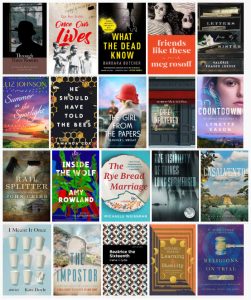
Before finalizing my cover, I asked myself:
- Can I read the title at thumbnail size?
- Is it obvious what the book is about?
- Would this stand out next to similar books?
If the answer was yes, I know I am on the right track.
A Mindset Shift That Helps Me Finish
This was another moment where I reminded myself why I started.
I wasn’t trying to win design awards.
I was trying to finally publish the book I have dreamed about for years—and make it inviting enough that someone would actually click on it.
That perspective makes all the difference.
Encouragement From Jeff
Formatting and cover design don’t have to stop you. Simple, clear, and readable will always beat perfect.
How I Will Price My Kindle Book for Quick Sales and Maximum Downloads
When it comes time to price my book, I hesitate about the price.
I’d poured time and effort into writing it, and part of me wondered, “What if I price it too low?” Another part worried, “What if I price it too high and no one buys it at all?”
What helps me was realizing something simple: my first goal wasn’t to maximize profit—it was to get readers.
Once I embraced that mindset, pricing became much easier.
Start With the Goal: Downloads, Not Dollars
As a first-time Kindle author, visibility matters more than price.
A lower price:
- Reduces hesitation for buyers
- Encourages impulse downloads
- Helps you gain early readers and reviews
Those early downloads do more for your long-term success than a higher price ever could.
The Sweet Spot for New Kindle Authors
For most first-time, nonfiction Kindle books, a great starting price is:
- $0.99 to $2.99
This range:
- Feels affordable and low-risk to readers
- Positions your book as helpful and accessible
- Makes it easy for someone to say “Why not?” and click buy
I remind myself that this wasn’t my last book—it was my first. The goal was momentum.
Use Promotions Strategically
One thing I loved discovering was that I didn’t have to lock myself into one price forever.
You can:
- Launch at a lower price for early traction
- Run occasional discounts or free promotions
- Adjust pricing later once your book has traction and reviews
That flexibility takes a lot of pressure off.
Think Like a Reader
Before finalizing my price, I asked:
- If I saw this book on Kindle, would this price feel fair?
- Does the value match what I’m promising in the title and description?
- Would I hesitate—or would I just download it?
Pricing should feel aligned with usefulness, not ego.
Remember Why You’re Doing This
At the end of the day, I remind myself why I’d always wanted to publish a book.
I wanted to share what I knew.
I wanted to help someone else move faster or avoid mistakes.
And yes—I wanted to finally see my book out in the world.
Pricing it affordably will help make that happen.
Reassurance From Jeff
You can always raise your price later. The most important thing is getting your book into readers’ hands.
How to Publish Your Book on Kindle Step by Step
This is the moment your dream turns into something real: you go from “I wrote a book” to “I’m a published author.” And the best part? Kindle Direct Publishing (KDP) walks you through it step-by-step.
Here’s the exact process
Step 1: Create Your KDP Account
- Go to Kindle Direct Publishing (KDP) and sign in with your Amazon account (or create one).
- In your account settings, fill in:
-
- Author/publisher info
- Payment details (so you can get paid)
- Tax info (KDP will prompt you)
Jeffs Tip
Do this first so publishing day feels easy instead of “ugh, forms.”
Step 2: Start a New Kindle eBook
From your KDP dashboard:
- Click Create
- Choose Kindle eBook (for a digital book)
(You can do paperback later—don’t overwhelm yourself.)
Step 3: Enter Your Book Details
This is the “storefront info” readers see.
You’ll add:
- Book title + subtitle (make it clear and benefit-driven)
- Author name (your name or pen name)
- Book description (simple, helpful, reader-focused)
- Keywords (what readers would type into Amazon search)
- Categories (the best-fit topics for your book)
- Age range (usually skip unless it’s for kids)
Jeffs Tip
Your subtitle and description should clearly say who it’s for and what problem it solves.
Step 4: Upload Your Manuscript
KDP lets you upload your formatted file (Word is common).
Then you’ll:
- Upload your manuscript
- Use KDP’s previewer to check chapters, spacing, headings, etc.
Important
Don’t panic if you spot a weird spacing issue. Fix it in your document, re-upload, and check again. That’s normal.
Step 5: Upload Your Cover
You have two options:
- Upload a cover you already made
- Use KDP’s built-in Cover Creator (simple templates)
Cover rule
Make sure the title is readable as a tiny thumbnail. That’s where most buyers first see it.
Step 6: Preview the Book Like a Reader
This step saves headaches.
Use the preview tool to check:
- Table of contents
- Chapter breaks
- Font size and spacing
- Any odd page breaks or blank pages
If something looks off: fix → re-upload → preview again.
Step 7: Choose Your Publishing Rights and Territories
Most authors choose “worldwide rights” (unless you have a special reason not to).
Step 8: Choose KDP Select (Optional)
KDP Select can be helpful, but it has a trade-off.
- Pros: Access to Kindle Unlimited readers, promo tools (like price deals/free promos)
- Con: Your eBook must be exclusive to Amazon for the enrollment period (you can’t sell the eBook elsewhere during that time)
If your goal is quick momentum on Amazon, many first-time authors choose it. If you want to “go wide” (sell everywhere), skip it.
Step 9: Set Your Price and Royalty
You’ll pick:
- Your price
- Your royalty option (KDP shows you the estimated earnings)
If your goal is quick sales + maximum downloads, keep it affordable, especially at launch.
Step 10: Hit Publish
This is the fun/scary/exciting part.
Click Publish Your Kindle eBook.
After that, your book typically goes live on Amazon within a short window once it’s reviewed (KDP will show the status in your dashboard).
What I Want You to Know
You don’t have to do this perfectly. You just have to do it.
You can update your manuscript, cover, description, and even pricing later.
Publishing is not a one-shot decision—it’s a “publish, improve, and grow” process.
What to Do After Your Book Goes Live So You Actually Get Sales & Downloads
When my book finally is live on Kindle, “Okay… now what?”
Publishing the book will be a huge milestone—but publishing is the beginning, not the finish line.
The good news? You don’t need a big launch, a massive email list, or fancy marketing skills to start getting downloads. You just need a few smart, simple actions.
First: Celebrate
Before doing anything else, pause for a moment.
You did something many people only talk about—you became a published author through Kindle Direct Publishing. That matters. Don’t rush past it.
Then, when you’re ready, move on to visibility.
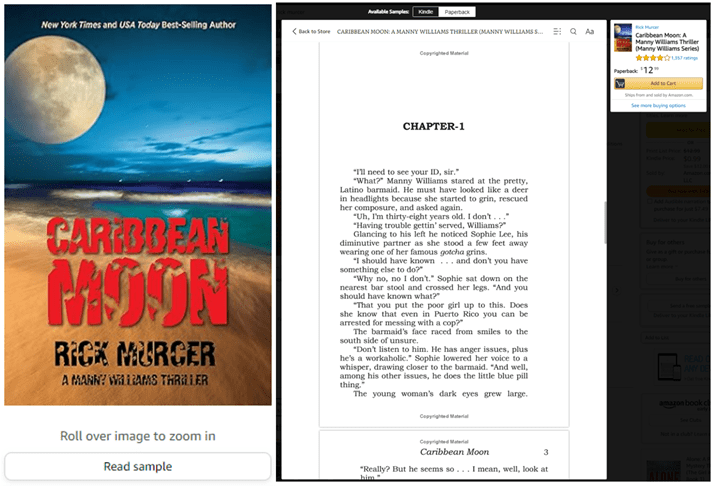
Step 1: Make Sure Your Amazon Page Is Working For You
Your book’s Amazon page is your silent salesperson.
Do a quick check:
- Is the title clear and easy to understand?
- Does the subtitle explain who the book is for or what problem it solves?
- Does the description focus on benefits, not just features?
If someone lands on your page, they should instantly think:
“This book is exactly what I need.”
Small tweaks here can make a big difference—and you can update this page anytime.
Step 2: Tell People About Your Book
I don’t want to sound salesy. But then I realized that I would be sharing something I created.
Simple ways to spread the word:
- Send a short email to friends or contacts
- Post once or twice on social media
- Mention it naturally in conversations or online groups you already belong to
You don’t need hype. You just need honesty:
“I finally published a book on Kindle. If this topic helps you, I’d love for you to check it out.”
Step 3: Encourage Early Reviews
Reviews help your book feel trustworthy—but don’t stress about them.
What does help:
- Asking early readers politely if they found the book helpful
- Including a short note at the end of your book thanking readers and inviting honest feedback
Never beg. Never pressure. Just invite.
Even a handful of genuine reviews can make a difference.
Step 4: Be Patient
One of the best lessons is that most books don’t explode overnight—and that’s okay.
Sales often come from:
- Consistency
- Small improvements
- Word of mouth over time
Each download is proof that someone chose your book. That’s something to be proud of.
Step 5: Think Long-Term, Not One-Time
Your first Kindle book opens doors:
- You can update and improve it
- You can write a second book
- You can build credibility around your topic
This isn’t about one launch day. It’s about finally stepping into something you once only dreamed about.
Jeffs Encouragement
Publishing your book is a huge accomplishment. Everything after that is just learning and refining.
You don’t need perfection.
You don’t need permission.
You just need to keep showing up.
If You’ve Ever Dreamed of Writing a Book, This Is Your Moment
For years, writing a book lived quietly on my “someday” list.
Life was busy. Responsibilities came first. And like many people, I assumed publishing a book was something reserved for other people—real authors, insiders, or those who started earlier in life.
But Kindle changed that.
What I learned through this journey is something I want every Boomer Biz HQ reader to understand: you don’t need permission, perfect timing, or a publishing deal to share what you know.
You already have life experience.
You already have lessons worth passing on.
And now, you have a platform that makes publishing possible.
Writing and publishing a Kindle book isn’t about fame or fortune. It’s about:
- Turning decades of experience into something meaningful
- Helping someone who’s a few steps behind you
- Proving to yourself that it’s never too late to do something new
If this article showed you anything, I hope it’s this: the process is manageable, the tools are accessible, and the hardest part is simply deciding to begin.
You don’t have to write a perfect book.
You don’t have to write a long book.
You just have to write your book.
And one day soon, you could be looking at your own name on a Kindle listing, thinking
“I finally did it.”
That moment alone is worth the effort.
Your next step is simple:
Open a blank document. Write one page. Then come back tomorrow and write another.
Boomer Biz HQ is here to walk with you every step of the way.
Thank you for taking the time to read “How To Publsih a Book on kindle”,
Jeff/ Boomer Biz HQ
Affiliate Disclosure
Amazon + Friends
Affiliate Disclosure: Some of the links on this website may be affiliate links. This means that if you click a link and make a purchase, I may earn a small commission at no extra cost to you. These commissions help support 65 Plus Life, Boomer Biz HQ, and Dawg Solutions. so I can continue creating free resources for older adults.
Amazon Disclosure: As an Amazon Associate, I earn from qualifying purchases. Any Amazon links used throughout this website may earn a commission when you purchase through them.
Wealthy Affiliate Disclosure: I am also a proud affiliate of Wealthy Affiliate. If you choose to join their platform through my referral link, I may earn a commission. I only recommend Wealthy Affiliate because it has personally helped me build websites and create income online, and I believe it can help other older adults learn these skills too.
Thank you for supporting my work — it truly means a lot
Jeff
- 10 Best Support Networks For Elderly Caregivers10 best support networks for elderly caregivers can be extremely valuable. Caregivers need as much support as they can possible receive, and being a older caregiver myself motivated me to share this information with you. Affiliate Disclosure Amazon + Friends Affiliate Disclosure: Some of the links on this website may be affiliate links. This means … Read more
- Easy Adaptive Digital Art Techniques For ArthritisEasy adaptive digital art techniques for arthritis suffers is to help people ready to give up from their arthrits limitations, now everyone might not be able to use these techniques depending on your arthritis severity. For those of you interested, this article is for you. Affiliate Disclosure Amazon + Friends Affiliate Disclosure: Some of the … Read more
- How To Maximize Your Kindle Unlimited AccountHow to maximize your kindle unlimited account without overspending your budget. Since joining kindle unlimited I have learned more than I could have otherwise, I download ebooks that will help me educate myself on gaining more writing skills. Affiliate Disclosure Amazon + Friends Affiliate Disclosure: Some of the links on this website may be affiliate … Read more
- How To Compare AARP Membership Plans For 2026How to compare AARP memberships plans for 2026. Making the decision to invest in an AARP membership plan or plans can be confusing for many, we are going to try our best to compare AARP membership plans in this article to make it easier for you. Affiliate Disclosure Amazon + Friends Affiliate Disclosure: Some of … Read more
- Is AARP Worth Joining In 2026 For Unexpected RetirementIs AARP worth joining in 2026 for most couples. Many couples will be trying to decide if its worth them to become a member of AARP. 65 Plus Life will be providing you information in hopes to making this decision less stressful. Affiliate Disclosure Amazon + Friends Affiliate Disclosure: Some of the links on this … Read more
- Are AARP Benefits Worth It In 2026 Help For Confused ReadersAre AARP beneits worth it in2026 help for confused readers. AARP can drive you crazy filling your email and snail mailbox, many of us are confused if this is something worth us joining. This article is to try my best to help any confused readers to make the best decision for themselves. Affiliate Disclosure Amazon … Read more
- Is AARP Worth It For Seniors 2026 Pros And ConsIs AARP worth it for seniors 2026 pros and cons might be on your mind as well, everyone might not benefit from being a member of AARP. That is what I am dealing with right now myself, trying to figure out myself. Affiliate Disclosure Amazon + Friends Affiliate Disclosure: Some of the links on this … Read more
- Best Adaptive Clothing Brands For 2026 ShoppersBest adaptive clothing brands for 2026 shoppers will help seniors in need of this type of clothing. With my neuropathy, I often struggling with buttons and zippers. Many of you might experience similar problems dressing from time to time, I am going to help you with the best brands for you to consider. Affiliate Disclosure … Read more
- A Simple Guide For Smart Budget-Friendly ShoppingA simple guide for smart budget-friendly shopping from 65 Plus Life. You can be sure that helping you is my priority in this article, the one thing that I am the most proud about is helping people like you get more for your money. Affiliate Disclosure Amazon + Friends Affiliate Disclosure: Some of the links … Read more
- Affordable Clothing That Makes Everyday Life EasierAffordable clothing that makes everyday life easier for 50 and older. Once we hit 50 something changes within many of our bodies, I know that was the case for me. 65 Plus Life focuses on helping you with adjusting to your senior living lifestyle, you are always my main priority. Affiliate Disclosure Amazon + Friends … Read more
Hi there Jeff, this is a really interesting article. Initially, I didn’t think I’d be into this type of activity but you’ve piqued my curiosity and I may think about doing this in the future. I like the layout of the article. At first, I thought it was quite long but the way it was written, the use of space, and the way you added in our own comments made the article really easy to read. I also like the step-by-step guides throughout, as well as the table of contents at the start and the end. In particular, I like the positive, supporting way in which the article was written. You’ve encouraged me to finetune my own writing style. How many books have you published on Kindle? Are there any setbacks that you’ve experienced that may be useful for readers to be aware of?
Thank you for taking the time to read and comment, Dean
I do get carried away with my articles when it comes to length, that is because I have so much I want to share with you that they become longer than I intend.
I have only published a few books on Kindle, but the experience has been extremely positive and a fun project to do. Even if you only do it for fun its worth doing at least once, no real setbacks once you write your book other than taking that first step.
Jeff
Hi there Jeff, this is a really interesting article. Initially, I didn’t think I’d be into this type of activity but you’ve piqued my curiosity and I may think about doing this in the future. I like the layout of the article. At first, I thought it was quite long but the way it was written, the use of space, and the way you added in our own comments made the article really easy to read. I also like the step-by-step guides throughout, as well as the table of contents at the start and the end. In particular, I like the positive, supporting way in which the article was written. You’ve encouraged me to finetune my own writing style. How many books have you published on Kindle? Are there any setbacks that you’ve experienced that may be useful for readers to be aware of?